“Plooto seamlessly works with our accounting systems and automatically reconciles our transactions.”
Accounts payable automation for QuickBooks users
Plooto connects to QuickBooks Online and Desktop to automate your AP and AR workflows. Bills import from QuickBooks automatically. Set approval rules, pay vendors by EFT, ACH, check, or credit card, and every payment reconciles back to QuickBooks without a single manual entry.

Connect Plooto to QuickBooks in a few steps
Link your Plooto and QuickBooks accounts to automate invoice management and payment workflows from start to finish.
Your accounting software handles the books. Plooto handles the payments. Approvals, reconciliation, and audit trails are managed automatically.

How QuickBooks AP automation works with Plooto
Get more visibility into your cash flow and control over your business payments. Import your bills, invoices, payees, customers, and bank accounts. Once you connect Plooto to QuickBooks, the AP workflow runs automatically:
- Bills import into Plooto
- Plooto emails the correct approvers
- Approvers sign off online
- Plooto makes the payment
- Plooto keeps a full audit trail
- Plooto reconciles your records in your QuickBooks account

QuickBooks AP automation for accounting firms and SMBs
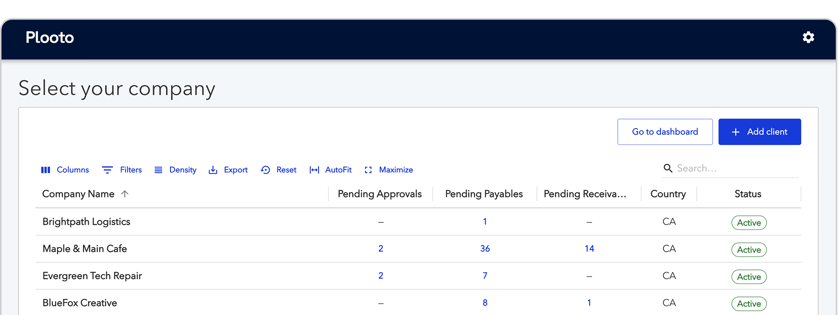
Accounting firms managing client books in QuickBooks use Plooto to handle AP and AR payments for their entire book of business from one platform. Connect each client's QuickBooks account, set custom approval workflows per client, process payments in batch, and reconcile every transaction back to each client's QuickBooks account automatically.Businesses running their own QuickBooks account use Plooto to replace manual bill payment processes. Instead of logging into your bank to wire payments, everything goes through Plooto: bills arrive from QuickBooks, get approved online, and go out automatically with a full audit trail.

What Plooto adds to your QuickBooks workflow
QuickBooks Online handles your accounting. Plooto adds the AP automation layer QuickBooks does not natively include.
- Pay electronically
- Pay with checks (let Plooto handle the printing and mailing)
- Pay international vendors
- Make batch payments
- Customize payment approvals
- Store and search digital records
- Automatic account reconciliation

Plooto and QuickBooks: What the integration covers
QuickBooks Online handles small business accounting for millions of businesses. Plooto adds the accounts payable automation layer. When connected, bills flow from QuickBooks into Plooto automatically. Payments go out through Plooto by EFT, ACH, check, or credit card, and reconcile back to QuickBooks in real time. No duplicate data entry. No manual reconciliation. This integration works with both QuickBooks Online and QuickBooks Desktop.

14k+ businesses trust Plooto







Christine Pilkington
CEO & Founder
Crisp
.png?width=64&height=64&name=replace-image-here%20(14).png)
Emily Ahier
Finance Manager
Greenhouse
“Using the Plooto platform we save approximately 40+ hours a month.”

Noah Maislin
Founder & CEO
Minutes Solutions
“Plooto gives us real-time financial reporting that helps us manage our cash flow better.”